> ## Documentation Index
> Fetch the complete documentation index at: https://omni.fireflo.au/llms.txt
> Use this file to discover all available pages before exploring further.
# Knowledge
> How to give AI agents the FAQs, articles, files and web pages they answer from, and how to find and fill the gaps.
**Knowledge** is what your AI agents may answer from. Every AI reply cites a source, and
nothing outside your knowledge is used. When an agent is not sure enough, it hands the
conversation to a person instead of guessing.
Knowledge is part of the [AI Agents](/batteries/ai-agents) battery, so your plan must
include **AI agents**.
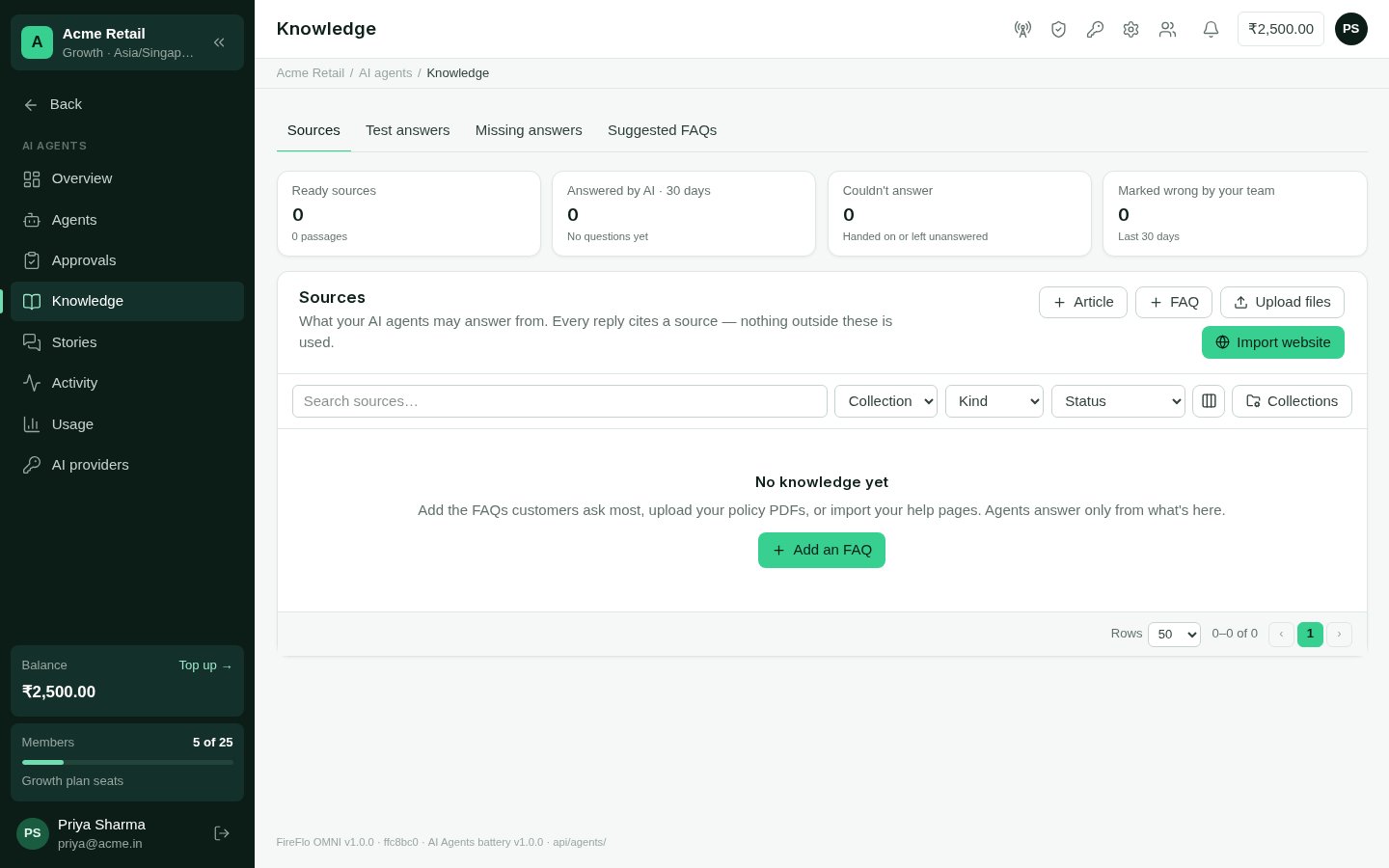
Open **Knowledge** from the AI agents menu. It has four tabs: **Sources**, **Test
answers**, **Missing answers** and **Suggested FAQs**.
 ## Sources
The **Sources** tab lists everything agents may answer from, with tiles for ready
sources, how many questions were answered, how many couldn't be, and how many answers
your team marked wrong. Each source shows how often it was used in the last 30 days.
There are four kinds of source:
| Kind | What it is |
| - | - |
| **FAQ** | A question customers ask and the answer agents give. Add **other ways customers ask** to help match short or Hinglish questions. Tick **Send this answer exactly** for prices, terms and legal wording: the answer then goes as written, with no AI rewording. |
| **Article** | Longer text written in Markdown. Headings split it into passages an answer can cite. |
| **File** | PDF, Word (.docx), CSV, text or Markdown, up to 20 MB each. Agents answer from the text inside, and PDFs cite the page an answer came from. Scanned images aren't read. To change a file's text, upload a new version and delete the old one. |
| **Website** | Your help pages. Give a web address and choose **Pages in its sitemap** (up to 50 pages) or **Just this page**. Navigation, headers and footers are left out, and robots.txt is respected. **Check for changes** daily or weekly; only changed pages are read again. |
Every source has a switch, **Agents use this source**. Turn it off and agents ignore it
without deleting it.
### Collections
Group sources by topic into **collections** — "Returns & warranty", for example. An agent
can be limited to some collections in its settings; an agent with none picked answers
from all of them.
### How sources are searched
A source is ready a few seconds after you save it. Agents find passages by meaning and by
keywords. A source marked **Keywords only** is found by its words alone, because no AI key
in the account could read its meaning — some self-hosted models can't.
## Test answers
**Test answers** lets you ask a question the way a customer would and see what the agent
would reply, and why. Nothing is sent.
Pick an agent to use its AI key, instructions and collections, or **No agent — all
knowledge** to use your organisation's AI key and everything in Knowledge.
Type the question. You see the reply, or why there isn't one: **Not sure enough —
would hand it to a person**, **Nothing in knowledge matches**, or **Couldn't ask the
AI**.
**Why this answer** lists the passages found, best first, and marks which were cited in
the reply.
## Missing answers
**Missing answers** lists questions agents couldn't answer confidently in the last 30 days,
and answers your team marked wrong in the Inbox — with alike questions grouped together.
Each group shows how often it was asked, how it ended, and what customers wrote.
* **Write FAQ** turns a group into an FAQ. The customers' own questions become its other
phrasings.
* **Dismiss** takes a group off the list.
## Suggested FAQs
When your plan also includes [Tickets](/batteries/tickets), a ticket your team solves can
lead to a suggested FAQ: Knowledge reads the conversation and drafts one when it would help
others.
**Suggested FAQs** lists these drafts. Nothing is used until someone approves it. Edit the
question, answer, other phrasings and collection, then choose **Approve & use** — or
**Reject** it. A rejected suggestion is not suggested again.
## Who may use Knowledge
| Permission | Lets someone | Roles that have it by default |
| - | - | - |
| See knowledge sources and test answers | Open every Knowledge tab and test answers | Owner, Admin, Support, Viewer |
| Add, change and remove knowledge sources | Add and edit sources and collections, write FAQs from missing answers, approve suggested FAQs | Owner, Admin, Support |
An Owner or Admin can change these on the **Roles** screen. See
[Team and roles](/using/team-and-roles).
This documentation is built and hosted on [Mintlify](https://mintlify.com), a developer documentation platform.
## Sources
The **Sources** tab lists everything agents may answer from, with tiles for ready
sources, how many questions were answered, how many couldn't be, and how many answers
your team marked wrong. Each source shows how often it was used in the last 30 days.
There are four kinds of source:
| Kind | What it is |
| - | - |
| **FAQ** | A question customers ask and the answer agents give. Add **other ways customers ask** to help match short or Hinglish questions. Tick **Send this answer exactly** for prices, terms and legal wording: the answer then goes as written, with no AI rewording. |
| **Article** | Longer text written in Markdown. Headings split it into passages an answer can cite. |
| **File** | PDF, Word (.docx), CSV, text or Markdown, up to 20 MB each. Agents answer from the text inside, and PDFs cite the page an answer came from. Scanned images aren't read. To change a file's text, upload a new version and delete the old one. |
| **Website** | Your help pages. Give a web address and choose **Pages in its sitemap** (up to 50 pages) or **Just this page**. Navigation, headers and footers are left out, and robots.txt is respected. **Check for changes** daily or weekly; only changed pages are read again. |
Every source has a switch, **Agents use this source**. Turn it off and agents ignore it
without deleting it.
### Collections
Group sources by topic into **collections** — "Returns & warranty", for example. An agent
can be limited to some collections in its settings; an agent with none picked answers
from all of them.
### How sources are searched
A source is ready a few seconds after you save it. Agents find passages by meaning and by
keywords. A source marked **Keywords only** is found by its words alone, because no AI key
in the account could read its meaning — some self-hosted models can't.
## Test answers
**Test answers** lets you ask a question the way a customer would and see what the agent
would reply, and why. Nothing is sent.
Pick an agent to use its AI key, instructions and collections, or **No agent — all
knowledge** to use your organisation's AI key and everything in Knowledge.
Type the question. You see the reply, or why there isn't one: **Not sure enough —
would hand it to a person**, **Nothing in knowledge matches**, or **Couldn't ask the
AI**.
**Why this answer** lists the passages found, best first, and marks which were cited in
the reply.
## Missing answers
**Missing answers** lists questions agents couldn't answer confidently in the last 30 days,
and answers your team marked wrong in the Inbox — with alike questions grouped together.
Each group shows how often it was asked, how it ended, and what customers wrote.
* **Write FAQ** turns a group into an FAQ. The customers' own questions become its other
phrasings.
* **Dismiss** takes a group off the list.
## Suggested FAQs
When your plan also includes [Tickets](/batteries/tickets), a ticket your team solves can
lead to a suggested FAQ: Knowledge reads the conversation and drafts one when it would help
others.
**Suggested FAQs** lists these drafts. Nothing is used until someone approves it. Edit the
question, answer, other phrasings and collection, then choose **Approve & use** — or
**Reject** it. A rejected suggestion is not suggested again.
## Who may use Knowledge
| Permission | Lets someone | Roles that have it by default |
| - | - | - |
| See knowledge sources and test answers | Open every Knowledge tab and test answers | Owner, Admin, Support, Viewer |
| Add, change and remove knowledge sources | Add and edit sources and collections, write FAQs from missing answers, approve suggested FAQs | Owner, Admin, Support |
An Owner or Admin can change these on the **Roles** screen. See
[Team and roles](/using/team-and-roles).
This documentation is built and hosted on [Mintlify](https://mintlify.com), a developer documentation platform.