> ## Documentation Index
> Fetch the complete documentation index at: https://omni.fireflo.au/llms.txt
> Use this file to discover all available pages before exploring further.
# WhatsApp templates
> How to submit WhatsApp message templates for Meta's approval, edit and delete them, and use them to start conversations and send broadcasts.
A **template** is a message Meta has approved in advance. It is the only thing you can
send to someone outside the [24-hour window](/channels/whatsapp#conversations-and-the-24-hour-window)
— so every conversation you start, and every WhatsApp broadcast, uses one.
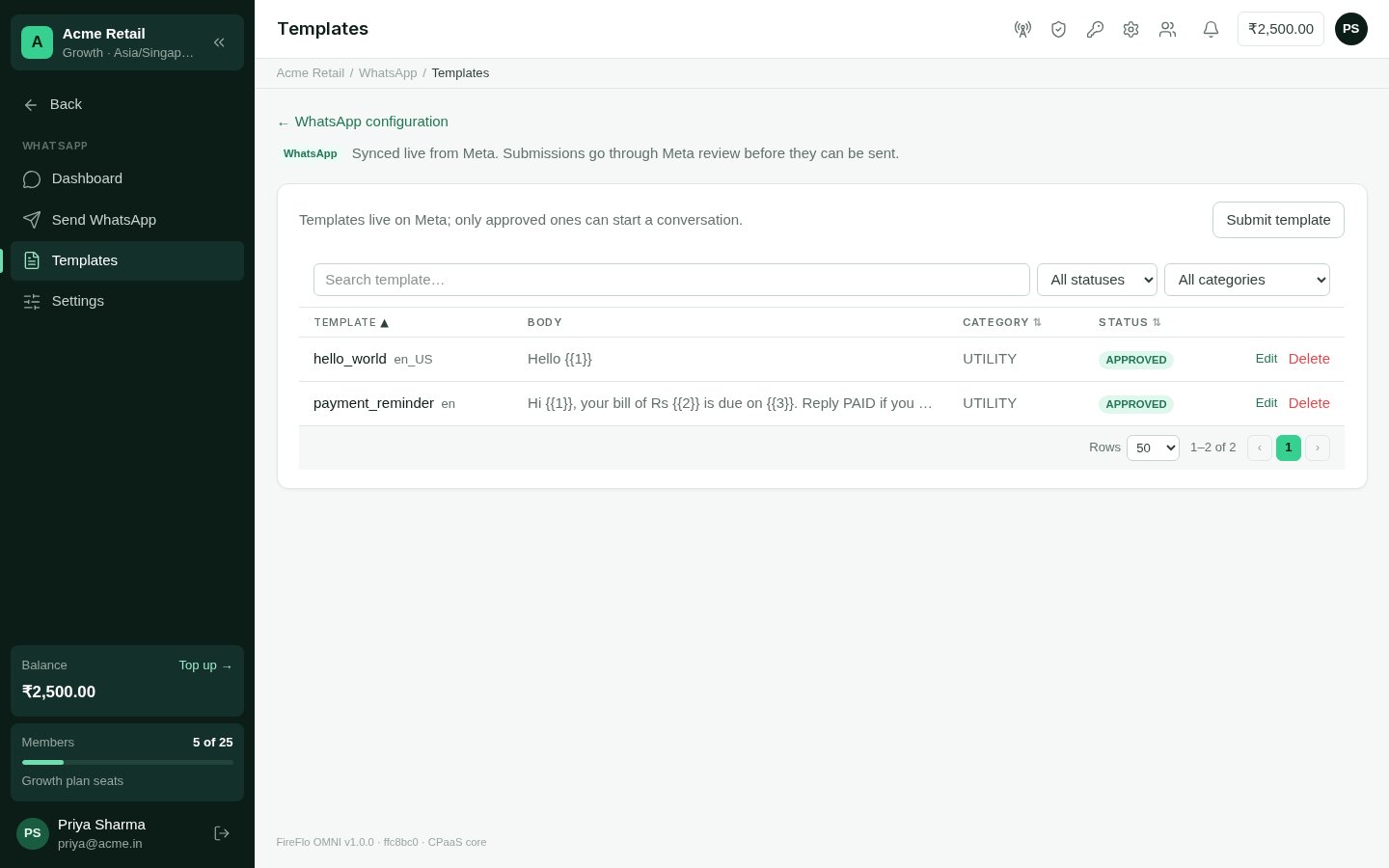
**WhatsApp → Templates** lists your templates, synced live from Meta. Search by name, or
filter by status and category.
 ## Submit a template
In **WhatsApp → Templates**, choose **Submit template**.
The **name** is lowercase with underscores, such as `order_shipped`. The
**category** is Utility, Marketing or Authentication. The **language** is a code such as `en`.
A **header** is either text, up to 60 characters, or an **image** — JPEG or PNG, up to
4 MB — which replaces a text header. A **footer** is up to 60 characters.
The message itself. Mark the parts that change with numbered variables: `{{1}}`,
`{{2}}` and so on.
The template appears as **PENDING** while Meta reviews it.
```text theme={null}
Hi {{1}}, your order {{2}} has shipped and arrives {{3}}.
```
## Its status
| Status | Meaning |
| :- | :- |
| **APPROVED** | Meta approved it. It can be sent. |
| **PENDING** | With Meta for review. It can't be sent yet. |
| **REJECTED** | Meta turned it down. You can edit it and send it back. |
Meta decides how long review takes.
## Edit or delete
**Edit** is offered on approved and rejected templates. You can change the body and
footer; the edit goes back to Meta, and the template returns to **PENDING** until it is
approved again.
**Delete** removes the template at Meta.
On a number FireFlo hosts for you, you see and use only the templates your account
submitted, and only those can be changed or deleted from your account.
## Send with a template
* **Send WhatsApp** offers approved templates only. Fill in each variable, then send to
numbers, contacts or segments. See [Send WhatsApp](/channels/whatsapp#send-whatsapp).
* In a [broadcast](/using/broadcasts), fill each variable from a column of your
recipient list (start typing `{{` or pick from the list), or type your own text. The
preview shows the message as the first person will see it.
* For a template that opens your catalogue, a broadcast lets you choose the product
shown on its card — or leave it empty to open the catalogue itself.
Some approved templates can't be sent from these screens yet, and are greyed out with
the reason: one with an image or other media header, one whose header has a variable,
and one with a button that needs its own value.
## From your own software
The OMNI API [lists](/api-reference/whatsapp/list-templates),
[submits](/api-reference/whatsapp/submit-template),
[edits](/api-reference/whatsapp/edit-template) and
[deletes](/api-reference/whatsapp/delete-template) WhatsApp templates, and its
[messages](/developers/messages-with-failover) send them.
## With AI Agents
With the [AI Agents](/batteries/ai-agents) battery, an agent that needs to write to
someone outside the window uses an approved template. When none fits, it drafts one and
submits it to WhatsApp — after a person approves it, if your policy says so.
## Who may
Submitting, editing and deleting templates needs the permission to **manage WhatsApp
message templates** — the **Owner** and **Admin** roles by default. Sending with a
template needs the permission to **send messages** (Owner, Admin and Support by default).
This documentation is built and hosted on [Mintlify](https://mintlify.com), a developer documentation platform.
## Submit a template
In **WhatsApp → Templates**, choose **Submit template**.
The **name** is lowercase with underscores, such as `order_shipped`. The
**category** is Utility, Marketing or Authentication. The **language** is a code such as `en`.
A **header** is either text, up to 60 characters, or an **image** — JPEG or PNG, up to
4 MB — which replaces a text header. A **footer** is up to 60 characters.
The message itself. Mark the parts that change with numbered variables: `{{1}}`,
`{{2}}` and so on.
The template appears as **PENDING** while Meta reviews it.
```text theme={null}
Hi {{1}}, your order {{2}} has shipped and arrives {{3}}.
```
## Its status
| Status | Meaning |
| :- | :- |
| **APPROVED** | Meta approved it. It can be sent. |
| **PENDING** | With Meta for review. It can't be sent yet. |
| **REJECTED** | Meta turned it down. You can edit it and send it back. |
Meta decides how long review takes.
## Edit or delete
**Edit** is offered on approved and rejected templates. You can change the body and
footer; the edit goes back to Meta, and the template returns to **PENDING** until it is
approved again.
**Delete** removes the template at Meta.
On a number FireFlo hosts for you, you see and use only the templates your account
submitted, and only those can be changed or deleted from your account.
## Send with a template
* **Send WhatsApp** offers approved templates only. Fill in each variable, then send to
numbers, contacts or segments. See [Send WhatsApp](/channels/whatsapp#send-whatsapp).
* In a [broadcast](/using/broadcasts), fill each variable from a column of your
recipient list (start typing `{{` or pick from the list), or type your own text. The
preview shows the message as the first person will see it.
* For a template that opens your catalogue, a broadcast lets you choose the product
shown on its card — or leave it empty to open the catalogue itself.
Some approved templates can't be sent from these screens yet, and are greyed out with
the reason: one with an image or other media header, one whose header has a variable,
and one with a button that needs its own value.
## From your own software
The OMNI API [lists](/api-reference/whatsapp/list-templates),
[submits](/api-reference/whatsapp/submit-template),
[edits](/api-reference/whatsapp/edit-template) and
[deletes](/api-reference/whatsapp/delete-template) WhatsApp templates, and its
[messages](/developers/messages-with-failover) send them.
## With AI Agents
With the [AI Agents](/batteries/ai-agents) battery, an agent that needs to write to
someone outside the window uses an approved template. When none fits, it drafts one and
submits it to WhatsApp — after a person approves it, if your policy says so.
## Who may
Submitting, editing and deleting templates needs the permission to **manage WhatsApp
message templates** — the **Owner** and **Admin** roles by default. Sending with a
template needs the permission to **send messages** (Owner, Admin and Support by default).
This documentation is built and hosted on [Mintlify](https://mintlify.com), a developer documentation platform.