> ## Documentation Index
> Fetch the complete documentation index at: https://omni.fireflo.au/llms.txt
> Use this file to discover all available pages before exploring further.
# Developer quickstart
> Make an API key, check it with GET /v1/me, send a message with POST /v1/messages, and receive your first webhook.
This page takes you from no key to a sent message and a verified webhook in a few
minutes.
**Before you start**
* Your account's plan must include **API access**. You can check under **Plan** in
the panel.
* You need the **Owner** or **Admin** role to make keys and webhooks.
* At least one channel should be connected, so a message has somewhere to go. A test
key works without one.
## 1. Make a key
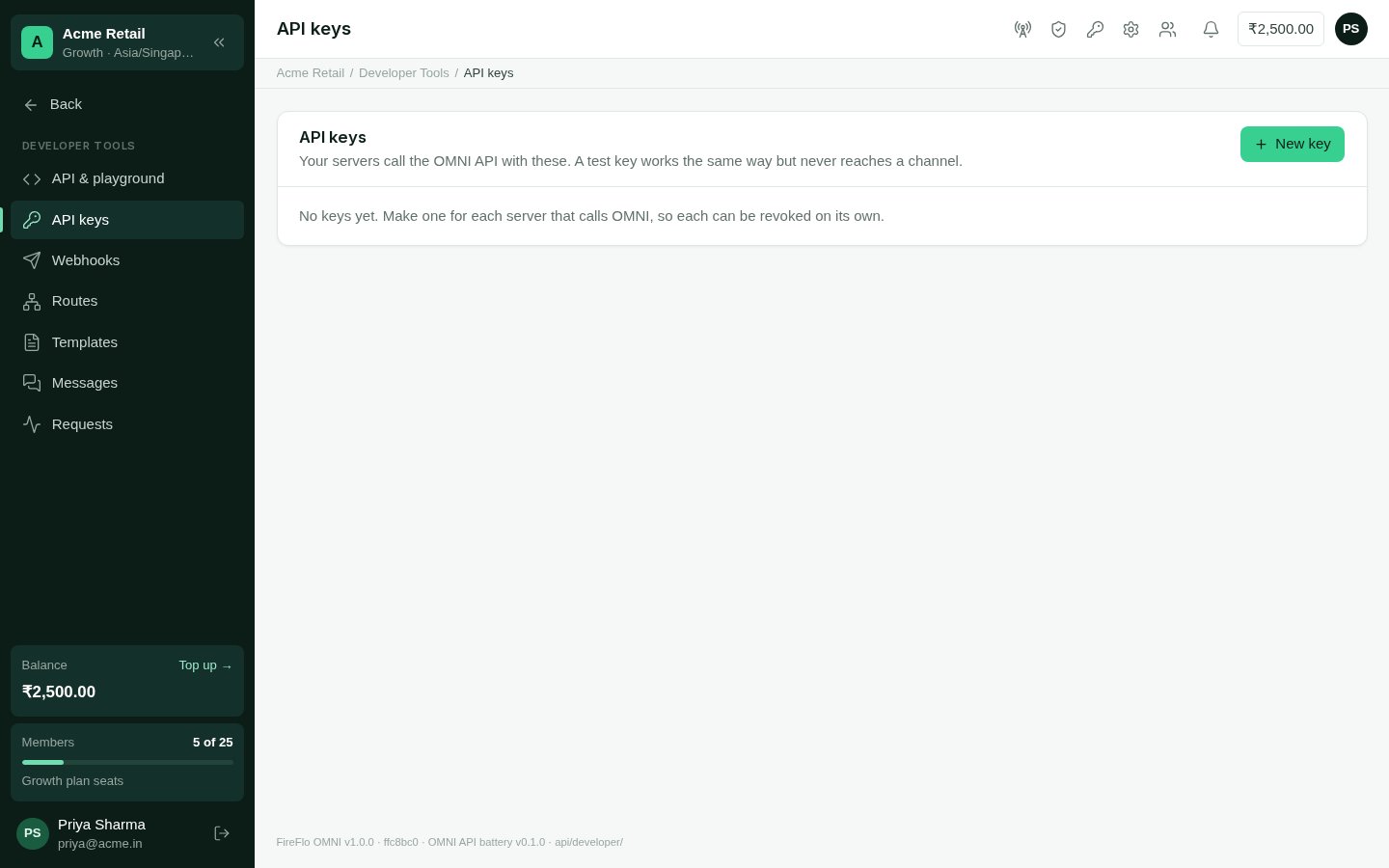
In the panel, open **API & playground** (under **OMNI API** in the menu). It shows
the API's **Base URL**. Copy it: every request below starts with it.
Open **Developer Tools → API keys** in the side menu, and choose **New key**. Give it a name that says which server uses it, tick what it
may do, and optionally limit the addresses it works from. For this guide, tick
`messages:send` and `messages:read`.
Tick **Test key** to practise: a test key works the same way, but nothing it sends
reaches a channel.
The key is shown **once**. Live keys start `ff_live_`, test keys `ff_test_`. Keep
it on your server, never in a browser or an app.
 In the examples, the Base URL and the key are read from the environment:
```bash theme={null}
export OMNI_API_URL=""
export OMNI_API_KEY="ff_test_..."
```
## 2. Check the key
`GET /v1/me` answers with the account and plan the key belongs to, and what the key may
do. It needs no particular scope, so it is the first call any integration should make.
```bash theme={null}
curl "$OMNI_API_URL/me" \
-H "Authorization: Bearer $OMNI_API_KEY"
```
```json theme={null}
{
"account": { "name": "Acme Retail", "plan": "Growth" },
"key": {
"name": "Billing server",
"prefix": "ff_test_…",
"test": true,
"scopes": ["messages:send", "messages:read"],
"allowed_ips": []
}
}
```
(The `key` object carries a few more fields: see
[GET /v1/me](/api-reference/account/get-me).)
## 3. Send a message
`POST /v1/messages` sends one message to one person. Give the number with its country
code in `to`, and what to say per channel in `content`. Without a `route`, OMNI tries
the account's default route, or each channel the account has switched on, in turn,
until one gets there.
```bash curl theme={null}
curl "$OMNI_API_URL/messages" \
-H "Authorization: Bearer $OMNI_API_KEY" \
-H "Content-Type: application/json" \
-H "Idempotency-Key: order-1042-shipped" \
-d '{
"to": "+919812345678",
"reference": "order-1042",
"content": {
"sms": { "text": "Your order 1042 has shipped." }
}
}'
```
```python Python theme={null}
import os
import requests
response = requests.post(
f"{os.environ['OMNI_API_URL']}/messages",
headers={
"Authorization": f"Bearer {os.environ['OMNI_API_KEY']}",
"Idempotency-Key": "order-1042-shipped",
},
json={
"to": "+919812345678",
"reference": "order-1042",
"content": {"sms": {"text": "Your order 1042 has shipped."}},
},
timeout=30,
)
response.raise_for_status()
message = response.json()
print(message["id"], message["status"])
```
```javascript Node theme={null}
const response = await fetch(`${process.env.OMNI_API_URL}/messages`, {
method: "POST",
headers: {
Authorization: `Bearer ${process.env.OMNI_API_KEY}`,
"Content-Type": "application/json",
"Idempotency-Key": "order-1042-shipped",
},
body: JSON.stringify({
to: "+919812345678",
reference: "order-1042",
content: { sms: { text: "Your order 1042 has shipped." } },
}),
});
if (!response.ok) throw new Error(JSON.stringify(await response.json()));
const message = await response.json();
console.log(message.id, message.status);
```
OMNI answers `202 Accepted` with the message as it stands: an `id` starting `msg_`, its
`status`, the `steps` it will try and the `attempts` so far. What happens next arrives
as events (step 4), or you can ask with `GET /v1/messages/{id}`.
* **`Idempotency-Key`** makes a retry safe: the same key is answered once, and its first
answer repeated.
* **`purpose`** is `transactional` (the default) or `marketing`. It decides which
opt-outs and quiet hours apply. See [Concepts](/get-started/concepts#people-and-consent).
* **Templates and routes**: send a saved `template` with its `values`, and name a
`route` to choose the channels and their order. See
[Messages with failover](/developers/messages-with-failover).
When a request is refused, the answer is `{"error": {"code", "message", "field"}}`,
with a code that never changes. See [Errors](/developers/errors).
## 4. Receive a webhook
In **Developer Tools → Webhooks**, choose **Add an endpoint**. Give an `https://`
address on your server that answers with a 2xx, and pick the events it wants, or
**All events**. Copy the **signing secret**; it starts `whsec_` and is shown once.
Every delivery carries an `X-FireFlo-Signature` header: `t=,v1=`.
`v1` is the HMAC-SHA256 of `"."` with your signing secret. Check it
against the raw bytes, before parsing, and refuse old timestamps.
Choose **Send a test** beside the endpoint. A `webhook.test` event arrives at
your server, and the screen says how it went.
```python Python theme={null}
import hashlib
import hmac
import time
def verify(raw_body: bytes, header: str, secret: str, tolerance: int = 300) -> bool:
parts = dict(item.split("=", 1) for item in header.split(","))
timestamp, signature = parts.get("t", ""), parts.get("v1", "")
if not timestamp.isdigit() or abs(time.time() - int(timestamp)) > tolerance:
return False
expected = hmac.new(
secret.encode(), f"{timestamp}.".encode() + raw_body, hashlib.sha256
).hexdigest()
return hmac.compare_digest(expected, signature)
```
```javascript Node theme={null}
import crypto from "node:crypto";
export function verify(rawBody, header, secret, tolerance = 300) {
const parts = Object.fromEntries(header.split(",").map((item) => item.split("=", 2)));
const timestamp = Number(parts.t);
if (!timestamp || Math.abs(Date.now() / 1000 - timestamp) > tolerance) return false;
const expected = crypto
.createHmac("sha256", secret)
.update(`${parts.t}.`)
.update(rawBody)
.digest("hex");
const given = Buffer.from(parts.v1 ?? "", "hex");
const wanted = Buffer.from(expected, "hex");
return given.length === wanted.length && crypto.timingSafeEqual(given, wanted);
}
```
Each delivery's body is one event:
```json theme={null}
{
"id": "evt_…",
"event": "message.succeeded",
"created": "2026-10-05T09:41:00+05:30",
"data": {
"message": { "id": "msg_…", "status": "succeeded", "reference": "order-1042" }
}
}
```
A delivery that isn't answered with a 2xx is tried again after 30 seconds, 5 minutes,
30 minutes, 2 hours and 12 hours. An endpoint that has failed for three days without a
single success is switched off. See [Webhooks](/developers/webhooks).
## Where to go next
Keys and scopes, conventions, errors and the playground.
Every endpoint, with a request you can try.
This documentation is built and hosted on [Mintlify](https://mintlify.com), a developer documentation platform.
In the examples, the Base URL and the key are read from the environment:
```bash theme={null}
export OMNI_API_URL=""
export OMNI_API_KEY="ff_test_..."
```
## 2. Check the key
`GET /v1/me` answers with the account and plan the key belongs to, and what the key may
do. It needs no particular scope, so it is the first call any integration should make.
```bash theme={null}
curl "$OMNI_API_URL/me" \
-H "Authorization: Bearer $OMNI_API_KEY"
```
```json theme={null}
{
"account": { "name": "Acme Retail", "plan": "Growth" },
"key": {
"name": "Billing server",
"prefix": "ff_test_…",
"test": true,
"scopes": ["messages:send", "messages:read"],
"allowed_ips": []
}
}
```
(The `key` object carries a few more fields: see
[GET /v1/me](/api-reference/account/get-me).)
## 3. Send a message
`POST /v1/messages` sends one message to one person. Give the number with its country
code in `to`, and what to say per channel in `content`. Without a `route`, OMNI tries
the account's default route, or each channel the account has switched on, in turn,
until one gets there.
```bash curl theme={null}
curl "$OMNI_API_URL/messages" \
-H "Authorization: Bearer $OMNI_API_KEY" \
-H "Content-Type: application/json" \
-H "Idempotency-Key: order-1042-shipped" \
-d '{
"to": "+919812345678",
"reference": "order-1042",
"content": {
"sms": { "text": "Your order 1042 has shipped." }
}
}'
```
```python Python theme={null}
import os
import requests
response = requests.post(
f"{os.environ['OMNI_API_URL']}/messages",
headers={
"Authorization": f"Bearer {os.environ['OMNI_API_KEY']}",
"Idempotency-Key": "order-1042-shipped",
},
json={
"to": "+919812345678",
"reference": "order-1042",
"content": {"sms": {"text": "Your order 1042 has shipped."}},
},
timeout=30,
)
response.raise_for_status()
message = response.json()
print(message["id"], message["status"])
```
```javascript Node theme={null}
const response = await fetch(`${process.env.OMNI_API_URL}/messages`, {
method: "POST",
headers: {
Authorization: `Bearer ${process.env.OMNI_API_KEY}`,
"Content-Type": "application/json",
"Idempotency-Key": "order-1042-shipped",
},
body: JSON.stringify({
to: "+919812345678",
reference: "order-1042",
content: { sms: { text: "Your order 1042 has shipped." } },
}),
});
if (!response.ok) throw new Error(JSON.stringify(await response.json()));
const message = await response.json();
console.log(message.id, message.status);
```
OMNI answers `202 Accepted` with the message as it stands: an `id` starting `msg_`, its
`status`, the `steps` it will try and the `attempts` so far. What happens next arrives
as events (step 4), or you can ask with `GET /v1/messages/{id}`.
* **`Idempotency-Key`** makes a retry safe: the same key is answered once, and its first
answer repeated.
* **`purpose`** is `transactional` (the default) or `marketing`. It decides which
opt-outs and quiet hours apply. See [Concepts](/get-started/concepts#people-and-consent).
* **Templates and routes**: send a saved `template` with its `values`, and name a
`route` to choose the channels and their order. See
[Messages with failover](/developers/messages-with-failover).
When a request is refused, the answer is `{"error": {"code", "message", "field"}}`,
with a code that never changes. See [Errors](/developers/errors).
## 4. Receive a webhook
In **Developer Tools → Webhooks**, choose **Add an endpoint**. Give an `https://`
address on your server that answers with a 2xx, and pick the events it wants, or
**All events**. Copy the **signing secret**; it starts `whsec_` and is shown once.
Every delivery carries an `X-FireFlo-Signature` header: `t=,v1=`.
`v1` is the HMAC-SHA256 of `"."` with your signing secret. Check it
against the raw bytes, before parsing, and refuse old timestamps.
Choose **Send a test** beside the endpoint. A `webhook.test` event arrives at
your server, and the screen says how it went.
```python Python theme={null}
import hashlib
import hmac
import time
def verify(raw_body: bytes, header: str, secret: str, tolerance: int = 300) -> bool:
parts = dict(item.split("=", 1) for item in header.split(","))
timestamp, signature = parts.get("t", ""), parts.get("v1", "")
if not timestamp.isdigit() or abs(time.time() - int(timestamp)) > tolerance:
return False
expected = hmac.new(
secret.encode(), f"{timestamp}.".encode() + raw_body, hashlib.sha256
).hexdigest()
return hmac.compare_digest(expected, signature)
```
```javascript Node theme={null}
import crypto from "node:crypto";
export function verify(rawBody, header, secret, tolerance = 300) {
const parts = Object.fromEntries(header.split(",").map((item) => item.split("=", 2)));
const timestamp = Number(parts.t);
if (!timestamp || Math.abs(Date.now() / 1000 - timestamp) > tolerance) return false;
const expected = crypto
.createHmac("sha256", secret)
.update(`${parts.t}.`)
.update(rawBody)
.digest("hex");
const given = Buffer.from(parts.v1 ?? "", "hex");
const wanted = Buffer.from(expected, "hex");
return given.length === wanted.length && crypto.timingSafeEqual(given, wanted);
}
```
Each delivery's body is one event:
```json theme={null}
{
"id": "evt_…",
"event": "message.succeeded",
"created": "2026-10-05T09:41:00+05:30",
"data": {
"message": { "id": "msg_…", "status": "succeeded", "reference": "order-1042" }
}
}
```
A delivery that isn't answered with a 2xx is tried again after 30 seconds, 5 minutes,
30 minutes, 2 hours and 12 hours. An endpoint that has failed for three days without a
single success is switched off. See [Webhooks](/developers/webhooks).
## Where to go next
Keys and scopes, conventions, errors and the playground.
Every endpoint, with a request you can try.
This documentation is built and hosted on [Mintlify](https://mintlify.com), a developer documentation platform.