> ## Documentation Index
> Fetch the complete documentation index at: https://omni.fireflo.au/llms.txt
> Use this file to discover all available pages before exploring further.
# Customers
> How to find any customer account, read where it stands, and change its product, trial, price, wallet, modules and status.
**Platform → Customers** lists every account on your service, including the customers of
your resellers. Open one to see everything about it and to make the changes only staff
can make.
 ## The list
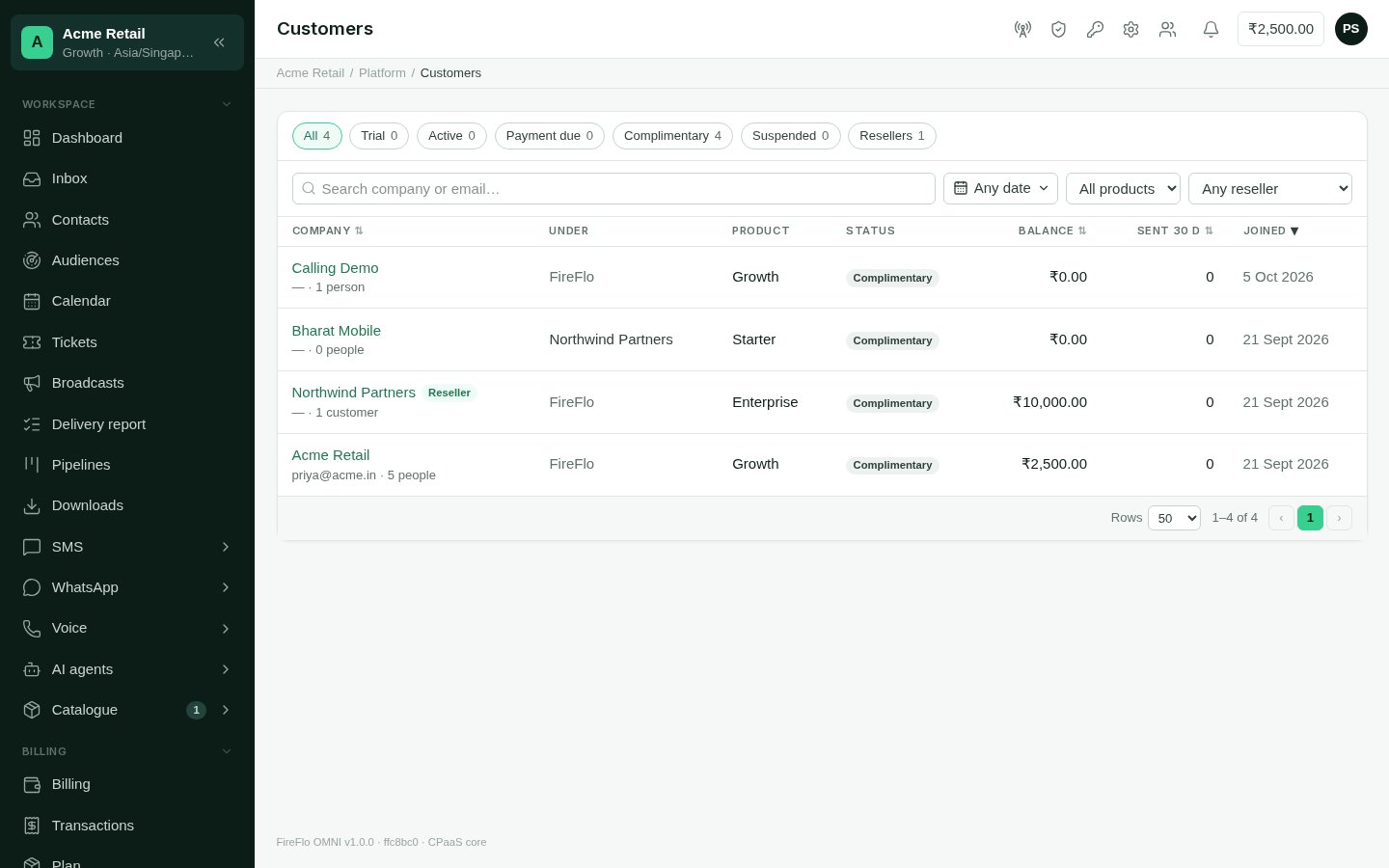
The chips along the top filter by status and show how many accounts are in each:
| Status | What it means |
| :- | :- |
| **Trial** | Inside the product's free trial. The badge says how many days are left. |
| **Active** | Paid up. The paid time hasn't run out. |
| **Payment due** | The trial or paid time has ended and no payment has been recorded. The account is read-only: sending, broadcasts and agents are paused until you record a payment. |
| **Complimentary** | Never lapses and never owes anything. |
| **Suspended** | Switched off by staff. Nobody there can sign in. |
| **Resellers** | Accounts that resell OMNI to customers of their own. |
Each row shows the **Company** with its owner's email and how many people it has (for a
reseller, how many customers). It also shows who it is **Under** (FireFlo, or the
reseller it belongs to), its **Product**, **Status**, wallet **Balance**, messages
**Sent** in the last 30 days, and when it **Joined**.
Search by company name or email. You can also narrow the list by the date the account
joined, by product, or to one reseller's customers. Sort by name, balance, messages sent
or joining date.
## A customer's page
The top of the page shows the company, its status, its owner's email and the
**Suspend** button. The tabs below hold everything else.
### Overview
**Account** shows the company, owner, time zone, who it is under, whether it is a
reseller, its number of people and when it joined. Select **Edit** to change:
* **Company**, its name.
* **Time zone**, as a name such as `Asia/Kolkata`.
* **Monthly price**, a price for this customer alone. It survives a change of product.
* **They resell to their own customers**, which makes the account a reseller. You can't
turn this off while it still has customers of its own.
**Subscription** shows the product, the monthly price, when the trial ends and the date
the account is paid until. From here you can:
* **Change the product.** What's included changes straight away. The new product's price
applies from the next payment, unless the customer has a price of their own, which is
kept. Changing product never starts another trial, and you can only choose an active
product.
* **Make the account complimentary.** Tick **Complimentary (never lapses)**. Untick it
to put the account back on paid terms. Its status then follows its trial and paid
dates again.
* **Extend the trial.** Enter 1 to 365 days and select **Extend**. The days are added
to the trial's current end, or to today if the trial has already ended.
### Team
Everyone who can sign in, with their roles, when they last signed in, and whether they
are active or still have an invitation pending. The customer runs their own team. This
tab is for reading.
### Customers (resellers only)
A reseller's page has a **Customers** tab listing the accounts under it, in the same
table as the main list. See [Resellers](/operators/resellers).
### Modules
The channels, batteries and pluggable modules (such as the OMNI API) this account has,
and why. Each row is badged:
| Badge | Meaning |
| :- | :- |
| **On · plan** | Their product includes it. |
| **On · override** | Their product doesn't include it, but you gave it to this account. |
| **Off · override** | Their product includes it, but you took it away from this account. |
| **Not in plan** | Their product doesn't include it. |
| **Withdrawn** | It is switched off for everyone under [Modules](/operators/modules). |
An **override** bends the product for this one account. It doesn't change the product.
Select **Override** (or **Change**) on the row.
Under **Why**, write the reason, such as "Negotiated at signup". An override stays in
place when the customer changes product, so someone will need to know why it is there.
Leave **Limit** blank for no ceiling. The product's own limit is not borrowed. If the
feature has a ceiling, such as a number of AI agents, enter it here.
Select **Switch on** or **Switch off**.
To undo an override, select **Follow the plan**. The account goes back to whatever its
product says. A withdrawn module can't be switched on for one customer.
### Billing
This tab holds the customer's money: their subscription payments and their message wallet.
**Record a payment** is for money received outside the panel, by transfer or cheque.
Enter the **Amount**, the **Months it pays for** (1 to 36), the date it was
**Received on**, and a **Reference** such as a UTR or cheque number. Then select **Record
payment**. The months are added from today, or from the date they're already paid until
if that is later. The account becomes **Active**, and its owner gets an email.
The **Wallet** is the customer's prepaid credit for messages. Enter an **Amount** and say
**Why**, then select **Update wallet**. A positive amount adds credit. A minus sign takes
credit away, and only this kind of correction may take a wallet below zero.
**Prices** sets which per-message prices this customer pays. Leave it on **Their
product's list**, or choose another [price list](/operators/pricing) when this customer
has negotiated prices of their own.
Below these you'll find the history of **Payments** (with who recorded each) and the
**Wallet history**: every movement, its kind, the balance after it, and why.
### Usage
Messages sent over the last 30 days, per channel, with a chart of messages sent per day.
### Broadcasts
The customer's broadcasts, newest first, with their channel, status, recipients,
delivered and failed counts.
## Suspending an account
Select **Suspend** at the top of the customer's page and confirm. Nobody at the
customer can sign in, and anything still running stops. Their data, settings and
history are kept. Select **Reactivate** to put everything back.
Suspending is different from **Payment due**. A customer whose payment is due can
still sign in and read everything. A suspended customer can't sign in at all.
This documentation is built and hosted on [Mintlify](https://mintlify.com), a developer documentation platform.
## The list
The chips along the top filter by status and show how many accounts are in each:
| Status | What it means |
| :- | :- |
| **Trial** | Inside the product's free trial. The badge says how many days are left. |
| **Active** | Paid up. The paid time hasn't run out. |
| **Payment due** | The trial or paid time has ended and no payment has been recorded. The account is read-only: sending, broadcasts and agents are paused until you record a payment. |
| **Complimentary** | Never lapses and never owes anything. |
| **Suspended** | Switched off by staff. Nobody there can sign in. |
| **Resellers** | Accounts that resell OMNI to customers of their own. |
Each row shows the **Company** with its owner's email and how many people it has (for a
reseller, how many customers). It also shows who it is **Under** (FireFlo, or the
reseller it belongs to), its **Product**, **Status**, wallet **Balance**, messages
**Sent** in the last 30 days, and when it **Joined**.
Search by company name or email. You can also narrow the list by the date the account
joined, by product, or to one reseller's customers. Sort by name, balance, messages sent
or joining date.
## A customer's page
The top of the page shows the company, its status, its owner's email and the
**Suspend** button. The tabs below hold everything else.
### Overview
**Account** shows the company, owner, time zone, who it is under, whether it is a
reseller, its number of people and when it joined. Select **Edit** to change:
* **Company**, its name.
* **Time zone**, as a name such as `Asia/Kolkata`.
* **Monthly price**, a price for this customer alone. It survives a change of product.
* **They resell to their own customers**, which makes the account a reseller. You can't
turn this off while it still has customers of its own.
**Subscription** shows the product, the monthly price, when the trial ends and the date
the account is paid until. From here you can:
* **Change the product.** What's included changes straight away. The new product's price
applies from the next payment, unless the customer has a price of their own, which is
kept. Changing product never starts another trial, and you can only choose an active
product.
* **Make the account complimentary.** Tick **Complimentary (never lapses)**. Untick it
to put the account back on paid terms. Its status then follows its trial and paid
dates again.
* **Extend the trial.** Enter 1 to 365 days and select **Extend**. The days are added
to the trial's current end, or to today if the trial has already ended.
### Team
Everyone who can sign in, with their roles, when they last signed in, and whether they
are active or still have an invitation pending. The customer runs their own team. This
tab is for reading.
### Customers (resellers only)
A reseller's page has a **Customers** tab listing the accounts under it, in the same
table as the main list. See [Resellers](/operators/resellers).
### Modules
The channels, batteries and pluggable modules (such as the OMNI API) this account has,
and why. Each row is badged:
| Badge | Meaning |
| :- | :- |
| **On · plan** | Their product includes it. |
| **On · override** | Their product doesn't include it, but you gave it to this account. |
| **Off · override** | Their product includes it, but you took it away from this account. |
| **Not in plan** | Their product doesn't include it. |
| **Withdrawn** | It is switched off for everyone under [Modules](/operators/modules). |
An **override** bends the product for this one account. It doesn't change the product.
Select **Override** (or **Change**) on the row.
Under **Why**, write the reason, such as "Negotiated at signup". An override stays in
place when the customer changes product, so someone will need to know why it is there.
Leave **Limit** blank for no ceiling. The product's own limit is not borrowed. If the
feature has a ceiling, such as a number of AI agents, enter it here.
Select **Switch on** or **Switch off**.
To undo an override, select **Follow the plan**. The account goes back to whatever its
product says. A withdrawn module can't be switched on for one customer.
### Billing
This tab holds the customer's money: their subscription payments and their message wallet.
**Record a payment** is for money received outside the panel, by transfer or cheque.
Enter the **Amount**, the **Months it pays for** (1 to 36), the date it was
**Received on**, and a **Reference** such as a UTR or cheque number. Then select **Record
payment**. The months are added from today, or from the date they're already paid until
if that is later. The account becomes **Active**, and its owner gets an email.
The **Wallet** is the customer's prepaid credit for messages. Enter an **Amount** and say
**Why**, then select **Update wallet**. A positive amount adds credit. A minus sign takes
credit away, and only this kind of correction may take a wallet below zero.
**Prices** sets which per-message prices this customer pays. Leave it on **Their
product's list**, or choose another [price list](/operators/pricing) when this customer
has negotiated prices of their own.
Below these you'll find the history of **Payments** (with who recorded each) and the
**Wallet history**: every movement, its kind, the balance after it, and why.
### Usage
Messages sent over the last 30 days, per channel, with a chart of messages sent per day.
### Broadcasts
The customer's broadcasts, newest first, with their channel, status, recipients,
delivered and failed counts.
## Suspending an account
Select **Suspend** at the top of the customer's page and confirm. Nobody at the
customer can sign in, and anything still running stops. Their data, settings and
history are kept. Select **Reactivate** to put everything back.
Suspending is different from **Payment due**. A customer whose payment is due can
still sign in and read everything. A suspended customer can't sign in at all.
This documentation is built and hosted on [Mintlify](https://mintlify.com), a developer documentation platform.