> ## Documentation Index
> Fetch the complete documentation index at: https://omni.fireflo.au/llms.txt
> Use this file to discover all available pages before exploring further.
# Pricing
> How to set what each channel costs per country and kind of message, keep separate price lists for products and customers, and how a reseller's markup sits on top.
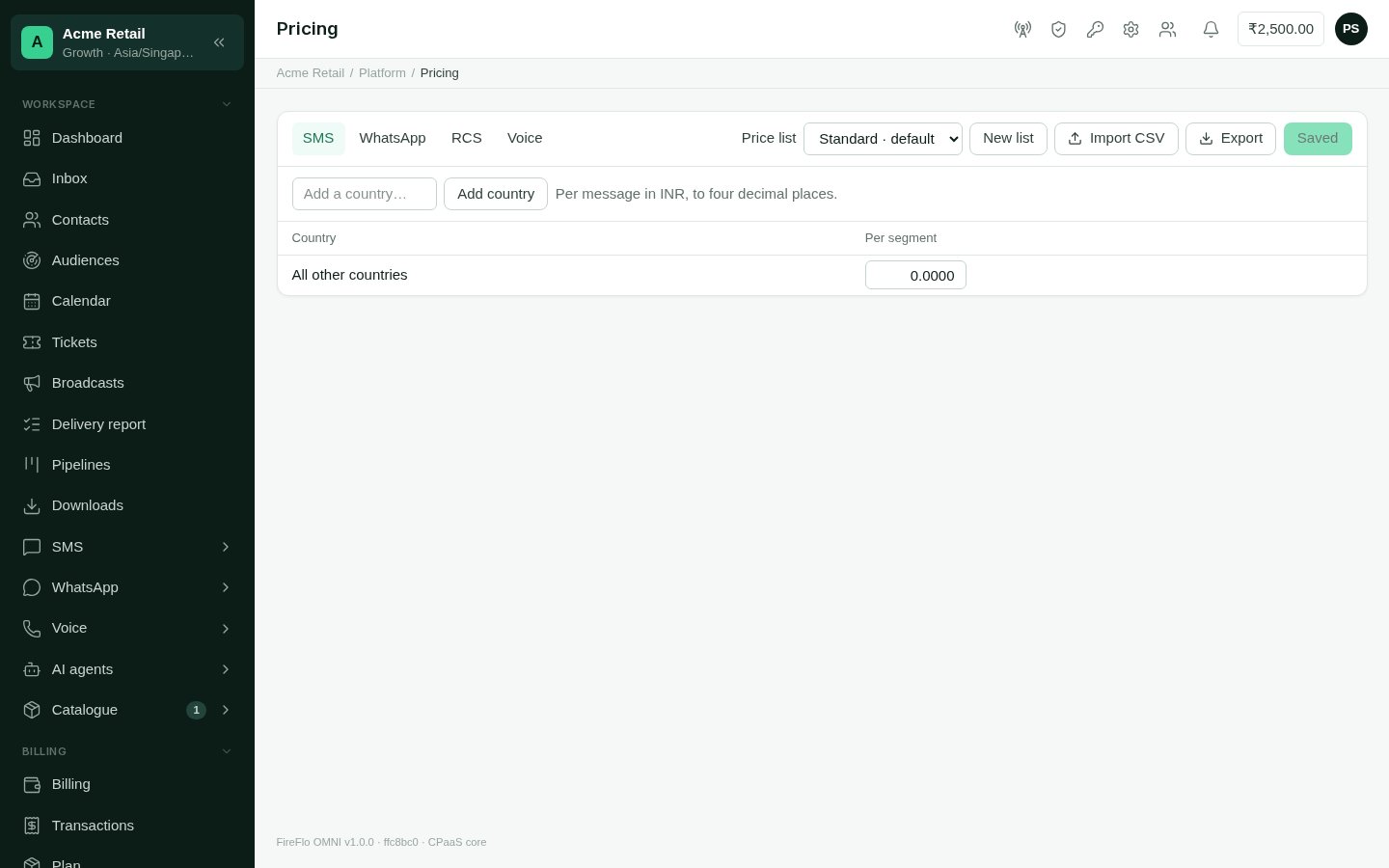
**Platform → Pricing** sets what your customers pay per message on each channel. Prices
are kept in **price lists**. Each list holds a grid for each channel: countries down the
side, kinds of message across the top.
 ## Which price a customer pays
Three questions decide the price of one message:
1. **Whose list?** The customer's own list if you've given them one. Otherwise, the list
their product carries. Otherwise, the **default** list.
2. **Which row?** The row for the recipient's country. If that country has no price of
its own, the **All other countries** row applies. That means a country nobody has
priced still has a price.
3. **Is there a markup?** A reseller's customer pays its reseller's
[markup](/operators/resellers#markup) on top.
Your customers see their prices on their [Billing](/using/billing) page. A price of zero
counts as "not priced yet", so it isn't listed there.
## What each channel charges for
| Channel | Kinds |
| :- | :- |
| **SMS** | Per segment |
| **WhatsApp** | Marketing, Utility, Authentication, Service reply |
| **RCS** | Basic, Rich card, Carousel or media |
| **Voice** | Per minute, Per AI agent minute |
Only channels this deployment carries appear as tabs.
## Set prices
Pick the channel from the tabs, and the list from **Price list**. The default list is
marked **· default**.
Type a two-letter country code in **Add a country…** and select **Add country**. The
**All other countries** row is always last.
Type each price in the currency shown above the grid, to up to four decimal places.
Changed rows are highlighted. Clearing a cell removes that price, so the country falls
back to **All other countries** for that kind.
Select **Save N changes**. Only the rows you changed are sent, so two people pricing
different countries at the same time don't overwrite each other.
A price can't be negative.
## Many countries at once
Select **Export** to download the channel's prices in the chosen list as a CSV: a
`country` column, then one column per kind. Edit it and bring it back with **Import
CSV**. The import sets every price in the file and leaves the rest alone. An empty cell in
the file changes nothing. A file can hold up to 2,000 rows. Use `*` as the country for
the **All other countries** row.
## Price lists
Select **New list** and name it to add a list. Use one for a product's prices, or for
one customer who negotiated their own.
To give a customer a list of their own, open their page and choose it under **Billing →
Prices**. See [Customers](/operators/customers#billing). Choose **Their product's list**
to put them back.
## What a change does to customers
A saved price applies to every customer whose price is decided by that list. That
includes resellers' customers, whose markup is worked out on the new price. What each
customer sees on their Billing page and in their spend estimates changes with it.
This documentation is built and hosted on [Mintlify](https://mintlify.com), a developer documentation platform.
## Which price a customer pays
Three questions decide the price of one message:
1. **Whose list?** The customer's own list if you've given them one. Otherwise, the list
their product carries. Otherwise, the **default** list.
2. **Which row?** The row for the recipient's country. If that country has no price of
its own, the **All other countries** row applies. That means a country nobody has
priced still has a price.
3. **Is there a markup?** A reseller's customer pays its reseller's
[markup](/operators/resellers#markup) on top.
Your customers see their prices on their [Billing](/using/billing) page. A price of zero
counts as "not priced yet", so it isn't listed there.
## What each channel charges for
| Channel | Kinds |
| :- | :- |
| **SMS** | Per segment |
| **WhatsApp** | Marketing, Utility, Authentication, Service reply |
| **RCS** | Basic, Rich card, Carousel or media |
| **Voice** | Per minute, Per AI agent minute |
Only channels this deployment carries appear as tabs.
## Set prices
Pick the channel from the tabs, and the list from **Price list**. The default list is
marked **· default**.
Type a two-letter country code in **Add a country…** and select **Add country**. The
**All other countries** row is always last.
Type each price in the currency shown above the grid, to up to four decimal places.
Changed rows are highlighted. Clearing a cell removes that price, so the country falls
back to **All other countries** for that kind.
Select **Save N changes**. Only the rows you changed are sent, so two people pricing
different countries at the same time don't overwrite each other.
A price can't be negative.
## Many countries at once
Select **Export** to download the channel's prices in the chosen list as a CSV: a
`country` column, then one column per kind. Edit it and bring it back with **Import
CSV**. The import sets every price in the file and leaves the rest alone. An empty cell in
the file changes nothing. A file can hold up to 2,000 rows. Use `*` as the country for
the **All other countries** row.
## Price lists
Select **New list** and name it to add a list. Use one for a product's prices, or for
one customer who negotiated their own.
To give a customer a list of their own, open their page and choose it under **Billing →
Prices**. See [Customers](/operators/customers#billing). Choose **Their product's list**
to put them back.
## What a change does to customers
A saved price applies to every customer whose price is decided by that list. That
includes resellers' customers, whose markup is worked out on the new price. What each
customer sees on their Billing page and in their spend estimates changes with it.
This documentation is built and hosted on [Mintlify](https://mintlify.com), a developer documentation platform.