> ## Documentation Index
> Fetch the complete documentation index at: https://omni.fireflo.au/llms.txt
> Use this file to discover all available pages before exploring further.
# Products and plans
> How to set up the products customers can be on — monthly price, trial, signup, seat limits and the channels and batteries each includes — and what a change does to the customers already on it.
A **product** (customers see it as their **plan**) is what an account is on. It sets the
monthly price, the length of the free trial, and what the account may use: channels,
batteries, the OMNI API, seats and access features. Every account is on one product.
**Platform → Products** lists your products down the side and opens the chosen one
beside them.
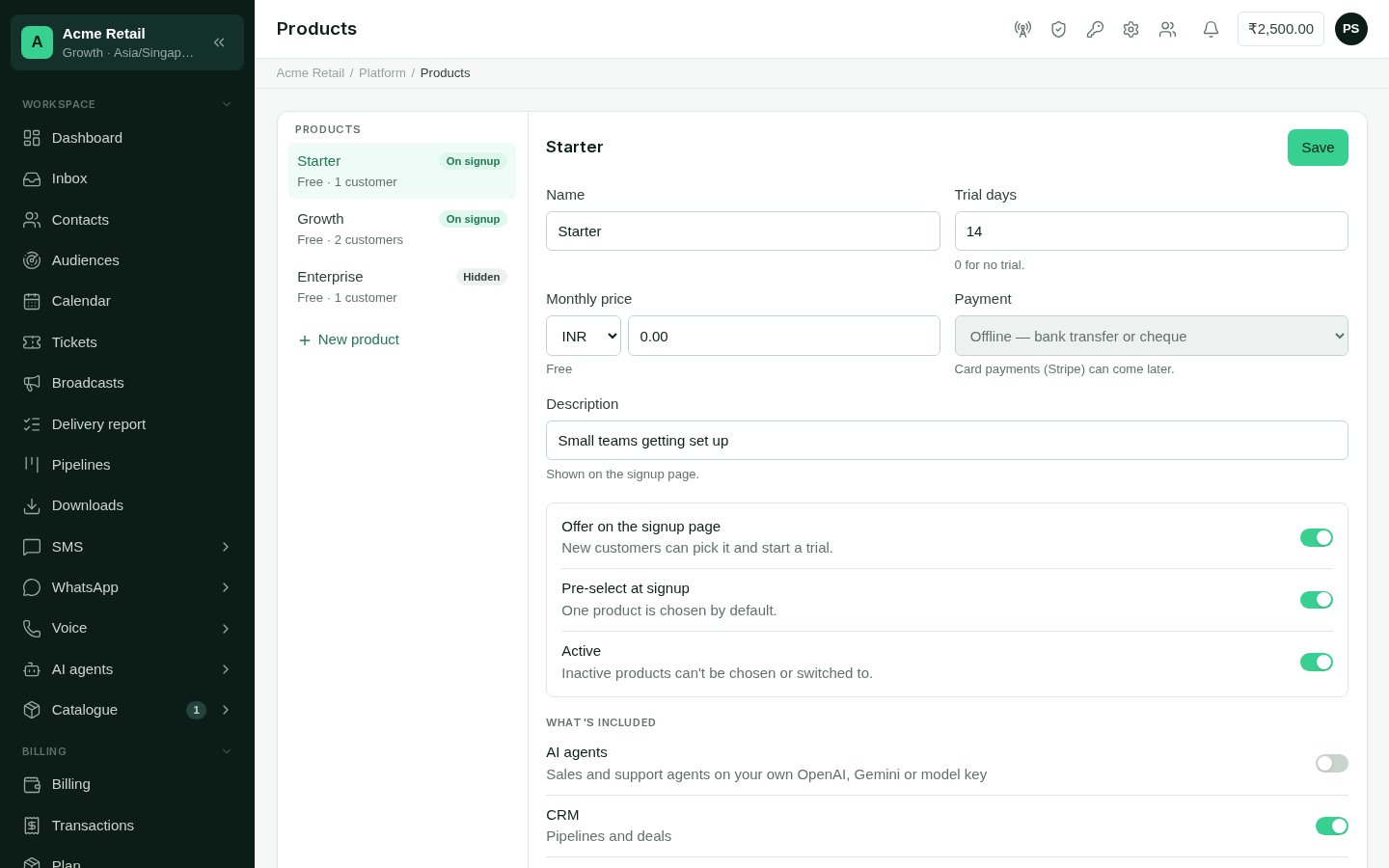 Each product in the list shows its monthly price and how many customers are on it, with
a badge:
* **On signup**: new customers can choose it on the signup page.
* **Hidden**: active, but not offered at signup. Staff and resellers can still put
customers on it.
* **Inactive**: can't be chosen or switched to.
## Create or change a product
Select a product in the list, or **New product** below it.
* **Name**, as customers see it.
* **Trial days**, from 0 (no trial) to 365.
* **Monthly price**, with its currency: INR, USD, EUR, GBP, AED, SGD or AUD.
* **Description**, shown on the signup page.
**Payment** is offline (bank transfer or cheque) for every product.
* **Offer on the signup page**: new customers can choose it and start a trial.
* **Pre-select at signup**: the product chosen by default. Only one product can be
pre-selected, so turning it on here turns it off on any other.
* **Active**: an inactive product can't be chosen or switched to.
Switch on each feature the product includes. Where a feature has a ceiling, set it
in **up to**. Leave it empty for no limit.
Select **Save**.
## What a product can include
Under **What's included**:
| Feature | What it gives |
| :- | :- |
| **AI agents** | The [AI Agents](/batteries/ai-agents) battery, with a ceiling on how many agents. |
| **CRM** | The [Pipelines](/batteries/pipelines) battery: pipelines and deals. |
| **API access** | The [OMNI API](/developers/overview). |
| **Team members** | A ceiling on how many people can sign in. Empty means unlimited. |
| **Custom roles** | Roles beyond the standard set. |
| **Audit log** | A record of who changed what. |
| **Single sign-on** | Signing in through the customer's own identity provider. |
| **Reseller accounts** | Says the product includes reselling. An account only becomes a reseller when you [turn it on](/operators/resellers#make-an-account-a-reseller) from its page. |
Under **Channel modules**: **SMS**, **WhatsApp**, **RCS** and **Voice**. A customer
sees a channel only when their product includes it.
A feature badged **coming soon** isn't available yet and can't be switched on. A channel
badged **switched off** has been turned off for every account. Select the badge to open
it under [Channels](/operators/channel-connections).
The **Calendar**, **Catalogue**, **Customer data** and **Tickets** batteries aren't
set on this screen. To give one to a single customer, or take it away, use the
**Modules** tab on [their page](/operators/customers#modules). To switch one off for
everyone, use [Modules](/operators/modules).
Message credit and channel connections are not part of a product. Credit is the
customer's wallet, which you top up from [their page](/operators/customers#billing).
Connections are set on each channel's settings and under
[Channels](/operators/channel-connections).
## What a change does to customers
* **Features and limits** change straight away for every customer on the product, except
where you've set an [override](/operators/customers#modules) for one account.
* **The monthly price** applies to customers who join or move to the product after the
change. Customers already on it keep the price on their subscription. To change one
customer's price, edit it on [their page](/operators/customers#overview).
* **Trial days** apply to new signups. To give one customer longer, extend their trial
from their page.
* **Making a product inactive** stops anyone choosing it or switching to it. Customers
already on it stay on it.
## Moving a customer to another product
Change the product from the customer's page under **Subscription**. See
[Customers](/operators/customers#overview). Resellers can move their own customers
between your active products, too. See [Resellers](/operators/resellers).
This documentation is built and hosted on [Mintlify](https://mintlify.com), a developer documentation platform.
Each product in the list shows its monthly price and how many customers are on it, with
a badge:
* **On signup**: new customers can choose it on the signup page.
* **Hidden**: active, but not offered at signup. Staff and resellers can still put
customers on it.
* **Inactive**: can't be chosen or switched to.
## Create or change a product
Select a product in the list, or **New product** below it.
* **Name**, as customers see it.
* **Trial days**, from 0 (no trial) to 365.
* **Monthly price**, with its currency: INR, USD, EUR, GBP, AED, SGD or AUD.
* **Description**, shown on the signup page.
**Payment** is offline (bank transfer or cheque) for every product.
* **Offer on the signup page**: new customers can choose it and start a trial.
* **Pre-select at signup**: the product chosen by default. Only one product can be
pre-selected, so turning it on here turns it off on any other.
* **Active**: an inactive product can't be chosen or switched to.
Switch on each feature the product includes. Where a feature has a ceiling, set it
in **up to**. Leave it empty for no limit.
Select **Save**.
## What a product can include
Under **What's included**:
| Feature | What it gives |
| :- | :- |
| **AI agents** | The [AI Agents](/batteries/ai-agents) battery, with a ceiling on how many agents. |
| **CRM** | The [Pipelines](/batteries/pipelines) battery: pipelines and deals. |
| **API access** | The [OMNI API](/developers/overview). |
| **Team members** | A ceiling on how many people can sign in. Empty means unlimited. |
| **Custom roles** | Roles beyond the standard set. |
| **Audit log** | A record of who changed what. |
| **Single sign-on** | Signing in through the customer's own identity provider. |
| **Reseller accounts** | Says the product includes reselling. An account only becomes a reseller when you [turn it on](/operators/resellers#make-an-account-a-reseller) from its page. |
Under **Channel modules**: **SMS**, **WhatsApp**, **RCS** and **Voice**. A customer
sees a channel only when their product includes it.
A feature badged **coming soon** isn't available yet and can't be switched on. A channel
badged **switched off** has been turned off for every account. Select the badge to open
it under [Channels](/operators/channel-connections).
The **Calendar**, **Catalogue**, **Customer data** and **Tickets** batteries aren't
set on this screen. To give one to a single customer, or take it away, use the
**Modules** tab on [their page](/operators/customers#modules). To switch one off for
everyone, use [Modules](/operators/modules).
Message credit and channel connections are not part of a product. Credit is the
customer's wallet, which you top up from [their page](/operators/customers#billing).
Connections are set on each channel's settings and under
[Channels](/operators/channel-connections).
## What a change does to customers
* **Features and limits** change straight away for every customer on the product, except
where you've set an [override](/operators/customers#modules) for one account.
* **The monthly price** applies to customers who join or move to the product after the
change. Customers already on it keep the price on their subscription. To change one
customer's price, edit it on [their page](/operators/customers#overview).
* **Trial days** apply to new signups. To give one customer longer, extend their trial
from their page.
* **Making a product inactive** stops anyone choosing it or switching to it. Customers
already on it stay on it.
## Moving a customer to another product
Change the product from the customer's page under **Subscription**. See
[Customers](/operators/customers#overview). Resellers can move their own customers
between your active products, too. See [Resellers](/operators/resellers).
This documentation is built and hosted on [Mintlify](https://mintlify.com), a developer documentation platform.